
Request Logs
Read the logs list, enable request capture, and inspect payloads in the capture viewer.
Logs list
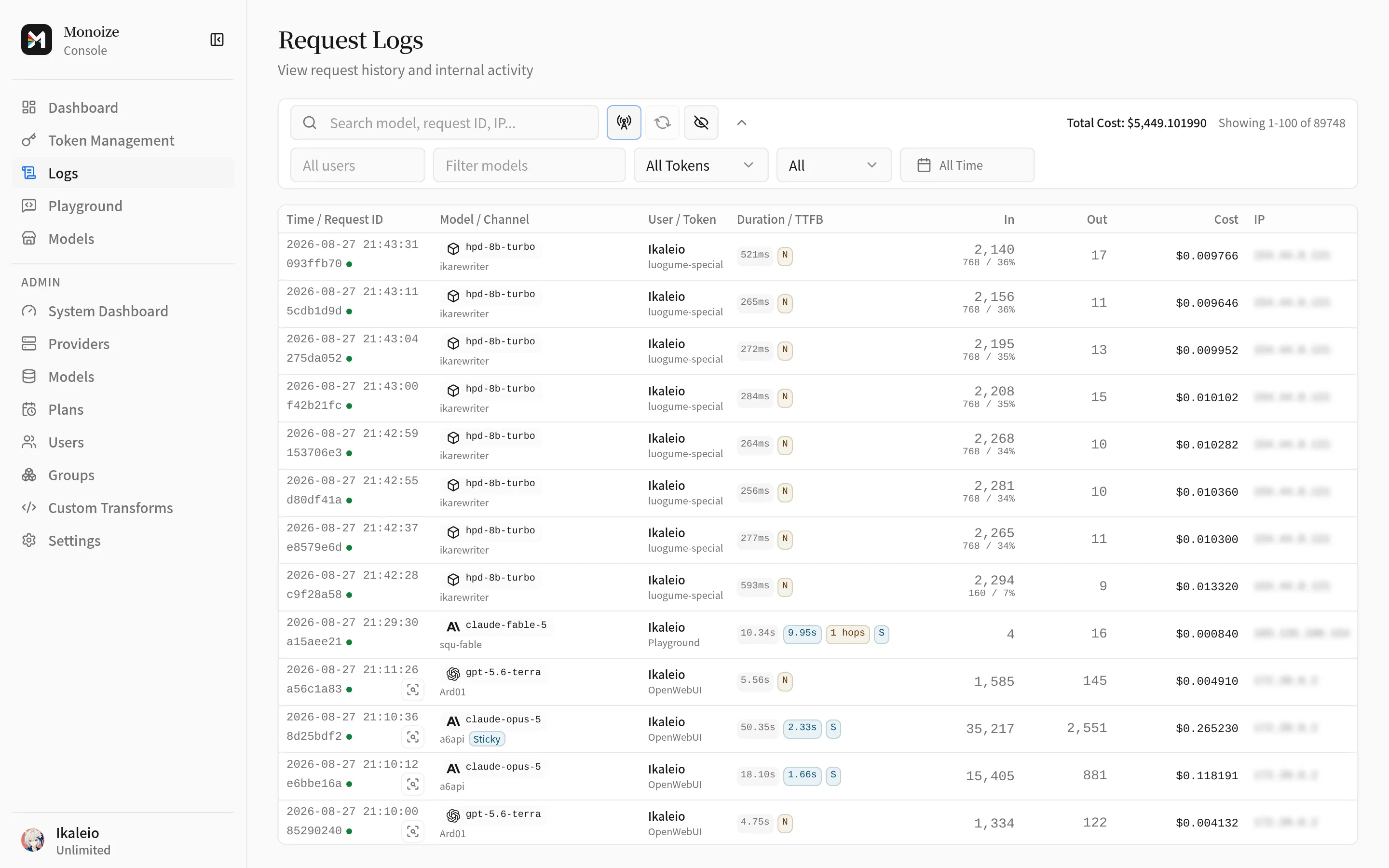
Open Logs in the sidebar. Monoize records one row for every API-key-authenticated forwarding request. Each row shows:
- the logical model, the serving Provider and Channel, and the API key name;
- token counts: input, output, cache read, cache creation, and reasoning tokens;
- the charge in USD;
- the status:
pending,success,error, orclient_gone; - timing: total duration, time to first byte, and tokens per second for streams.
The list enables real-time updates by default. Disable Real-time updates to stop the event stream and fallback polling. Use Refresh to update the list manually.
Failed attempts
When a request needed more than one upstream attempt, the row lists each failed hop in order. Each hop shows the Provider, the Channel, the upstream status code, and the error text. Use this list to see which Channel failed and why the request moved forward.
Request capture
Capture stores the exact payload of each upstream attempt on disk. Capture is off by default. Two switches control it:
- System switch. A
super_adminenables request capture in Settings. When this switch is off, no capture is written for any key. - Per-key mode. Each API key sets
request_capture_mode:off: never capture.capture-all: capture every request that reaches an upstream.capture-only-abnormal: capture only failed or anomalous requests.
Capture applies to these endpoints: POST /v1/responses, POST /v1/chat/completions, POST /v1/messages, POST /v1/images/generations, and POST /v1/images/edits.
Image API and multimodal payloads
Each Image API sub-request writes one capture. When n is greater than 1, the capture request id gets the suffix :img:{i}. Here i is the 0-based sub-request index.
Monoize stores a multipart/form-data body as a structured JSON object. The object lists each part in wire order. A text part records the field name and the text. A file part records the field name, the file name, the content type, the byte length, and the base64 data. This rule applies to the received POST /v1/images/edits body and to the multipart form sent to an openai_image upstream.
JSON image edits use normal JSON capture. Their images and mask references remain in the captured request body. For openai_image, upstream captures use JSON for retained URL or file references, or multipart for inline uploads.
Capture keeps image and other multimodal payloads exactly as they appear in the source body. Monoize does not redact or re-encode them.
Retention and rotation
Each API key sets request_capture_retention: 5m, 1h, 24h, or 7d. The default is 24h. A capture expires after this period. A cleanup task removes expired captures at startup and then every hour.
A super_admin can set monoize_request_capture_max_total_bytes in Settings. The dashboard shows the value in MiB. When the total size of all captures exceeds this cap, Monoize deletes the oldest captures first until the total fits. Set 0 to disable the cap.
Monoize compresses new capture files with zstd in a background task. It still reads uncompressed files from earlier versions.
Capture viewer
Rows with a stored capture show a capture indicator. Click it to open the viewer. The viewer shows, for each attempt:
- Downstream request: the original request body from the client;
- Upstream request: the exact encoded request sent upstream;
- URP: the request after all transforms;
- Response: the non-streaming result. For a streaming attempt, Monoize shows the reconstructed final response;
- Output Stream: the raw SSE frames of a streaming attempt, with syntax highlighting. This tab appears only when the attempt recorded stream frames;
- the transform chain that ran, with scope and order.
The viewer shows an inline preview under a string that holds an image data URL or base64 image data. Image data that fails to decode collapses the preview and keeps the text.
Users with the user role see their own captures only, and see only API-key-scope transform entries. Admins can view captures owned by user-role accounts.
Troubleshooting
| Symptom | Cause | Action |
|---|---|---|
| No capture indicator on new rows | Capture persistence finishes after the live row arrives | Wait for the automatic list refresh, or reload once |
capture_not_found | The capture expired, was rotated out, or your role cannot view it | Raise the key's capture retention, or ask the owner |
| Rows missing for a key | The key belongs to another user | Sign in as the key owner or as an admin |